
How to Connect VaocherApp with Mailchimp for Automated Gift Voucher Campaigns
Ever feel like you’re juggling a dozen tasks while also trying to keep your gift voucher sales humming along? In the bustling world of small businesses, managing customer relationships and marketing efforts can often feel like an endless game of whack-a-mole. But what if there was a way to put some of that on autopilot, especially when it comes to nurturing those precious gift voucher leads and sales? Good news, mate, there is! By connecting your VaocherApp account with Mailchimp, you can unlock a world of automated marketing possibilities, turning potential sales into actual revenue without constant manual effort.
This isn’t just about sending a few emails; it’s about creating intelligent, timely, and personalised communication that keeps your business top-of-mind. Imagine gift voucher purchasers receiving a warm welcome, or customers who almost bought a voucher getting a gentle reminder, all without you lifting a finger. Integrating VaocherApp and Mailchimp isn’t just a smart move; it’s a game-changer for businesses looking to scale their gift voucher program and build stronger customer loyalty. If you’re still refining your overall voucher strategy, this guide on how to sell gift vouchers online effectively is a great companion read. Let’s dive in and see how you can make this powerful duo work wonders for your business!
Why Automate Your Gift Voucher Marketing?
In today’s fast-paced digital landscape, efficiency is king, and automation is its most loyal subject. For businesses selling gift vouchers, the advantages of automating your marketing efforts are truly undeniable. Gone are the days of manually tracking every lead or sending out individual emails; now, you can set up powerful workflows that handle the heavy lifting for you.
Boost Sales Without Lifting a Finger
Think of automation as your tireless marketing assistant, working around the clock to capture sales opportunities. Once your VaocherApp Mailchimp integration is up and running, it can automatically follow up with potential customers, encourage repeat purchases, and even remind recipients about their expiring vouchers. Through this seamless connection, you can consistently engage your audience, leading to a natural increase in your gift voucher sales volume, all while you focus on what you do best – running your amazing business.
Nurture Customer Relationships
Building lasting relationships is fundamental to long-term success, and automated email campaigns are fantastic tools for this. A welcome series, for instance, can introduce new customers to your brand, sharing your story and special offers, making them feel valued from the get-go. Similarly, personalised birthday messages, complete with a special voucher offer, not only delight customers but also encourage them to spend more with you. These thoughtful touches, delivered consistently and automatically, significantly enhance customer loyalty and brand perception. Businesses also seeing strong retention results often explore strategies like how gift cards drive repeat business to maximise long-term customer value.
Recover Lost Revenue
How many times have potential customers started the purchase process only to drop off before completing their order? Sadly, abandoned carts are a common occurrence in the online world, representing a significant chunk of lost revenue. Luckily, with a clever VaocherApp Mailchimp integration, you can set up automated abandoned cart campaigns that gently nudge these customers back to complete their purchase. Often, a timely reminder or a small incentive is all it takes to recover those almost-sales, turning hesitation into happy customers and forgotten opportunities into valuable transactions.
Connecting VaocherApp and Mailchimp: Your Step-by-Step Guide
Now, for the exciting part: getting these two powerhouses to talk to each other! Setting up your VaocherApp Mailchimp integration might seem a bit technical at first glance, but I promise, it’s more straightforward than you think. Just follow these steps, and you’ll be automating your gift voucher campaigns in no time.
Before You Begin: The Essentials
Before diving into the technical bits, ensure you have a few things sorted:
- An active VaocherApp account with gift vouchers set up.
- An active Mailchimp account, preferably with a relevant audience (mailing list) already created. This is where your customer data will live.
- Admin access to both platforms.
- A clear idea of which customer data you want to transfer (e.g., name, email, purchase date, voucher value).
Step 1: Get Your Mailchimp API Key
To connect Mailchimp with VaocherApp, you’ll first need to create or copy your Mailchimp API key.
- Log in to your Mailchimp account.
- Go to your Mailchimp API keys section.
- Create a new API key or copy an existing one.
- Keep the key handy — you’ll paste it into VaocherApp in the next step.
Step 2: Bridging the Gap
Once you have your Mailchimp API key, you can connect it inside VaocherApp.
- Log in to Mailchimp and copy your Mailchimp API key.
- Go to your VaocherApp Mailchimp integration page
- Paste the Mailchimp API key into the API key field.
- Select the Audience list you want VaocherApp to push customer profiles into.
- Save the integration to complete the connection.
Unleashing Automation: Mailchimp Campaigns for Your VaocherApp Vouchers
With your VaocherApp Mailchimp integration now firmly established, the real fun begins: setting up automated campaigns! These workflows are your secret sauce for converting more sales and keeping customers engaged.
The Welcome Wagon: New Customer Welcome Series
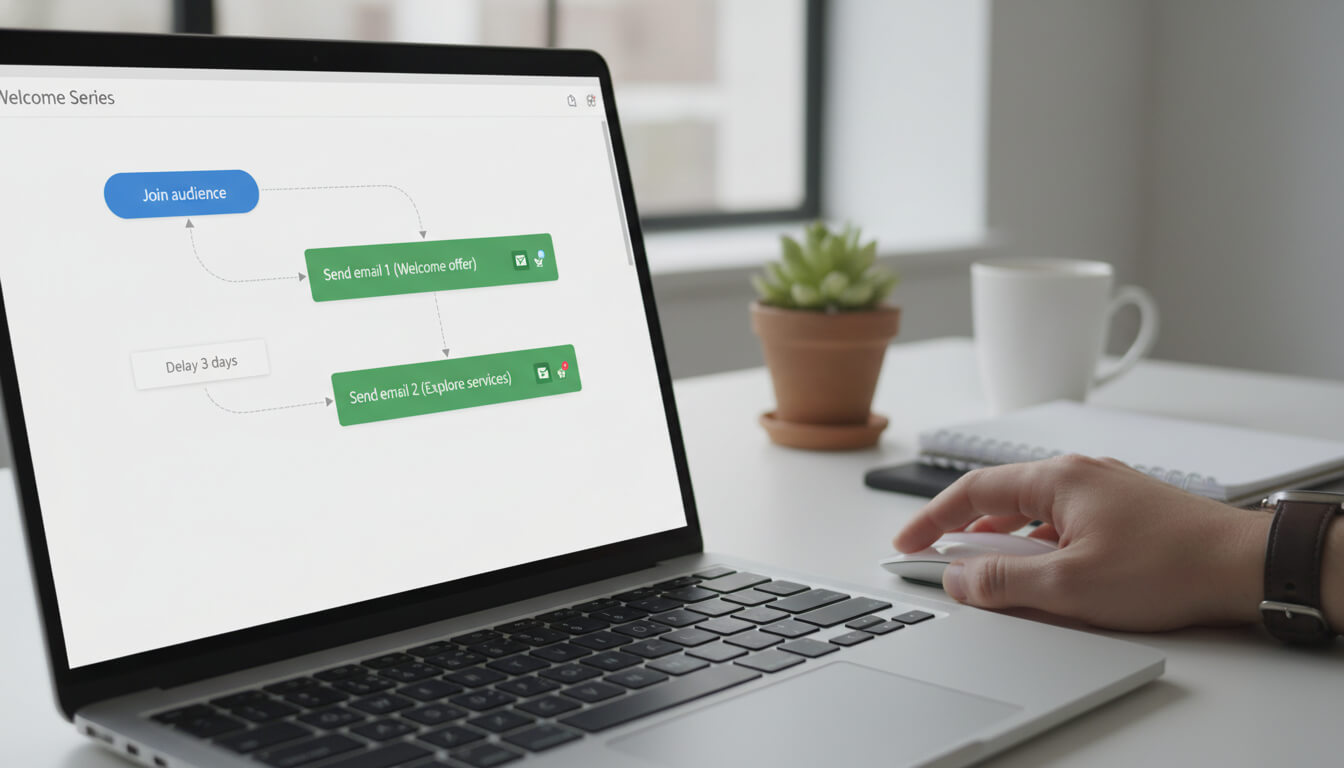
When someone purchases a gift voucher, they’ve just taken a positive step towards your business, haven’t they? That’s the perfect moment to roll out the digital welcome mat with an automated series of emails. This series aims to thank them, introduce them to your brand, and perhaps even encourage them to explore more of what you offer.
Setting Up Your Welcome Automation
- Trigger: In Mailchimp, create a new “Automated Customer Journey.” The trigger for this journey should be “When a subscriber is added to your audience” (specifically, the audience that your VaocherApp data is feeding into).
- First Email (Immediate): Send a warm “Thank You for Your Gift Voucher Purchase!” email. Acknowledge their thoughtful gesture, perhaps offer a brief introduction to your business’s values, and clearly outline how the recipient can redeem their voucher (if they bought it for themselves) or how the gift works (if they bought it for someone else).
- Second Email (2-3 Days Later): Follow up with an email showcasing popular services or products that the voucher recipient might enjoy. This helps them visualise how they can use their gift. You could also include a testimonial or two to build trust.
- Third Email (5-7 Days Later): Gently remind them of any upcoming events, special promotions, or encourage them to book an appointment if your business requires it. The goal here is to keep your business top-of-mind without being pushy.
Birthday Bliss: Celebrate and Sell More
Everyone loves a birthday surprise, and businesses that remember them stand out! Collecting customer birth dates (ensure you have their consent for marketing!) allows you to send timely, personalised offers.
Crafting a Birthday Campaign
- Data Collection: Ensure your Mailchimp audience has a “Birthday” field, and if possible, configure your VaocherApp integration or lead capture forms to collect this information.
- Trigger: Set up a Mailchimp automated email journey that triggers “1 day before a subscriber’s birthday” or “on their birthday.”
- The Offer: Send a celebratory email wishing them a happy birthday. Include a special, time-sensitive offer – perhaps a small discount on their next purchase, a complimentary upgrade, or a specific voucher for a service. Frame it as a birthday treat from you!
- Personalisation: Use merge tags to include their name in the subject line and email body, making the message feel genuinely personal.
The Second Chance: Abandoned Cart Recovery
Imagine this: a customer is moments away from purchasing a gift voucher, gets distracted, and leaves the page. Without intervention, that sale is likely gone forever. Enter the abandoned cart recovery series! If checkout drop-offs are a recurring issue, you may also find value in learning why customers abandon gift voucher purchases.
Designing Your Abandoned Cart Flow
- Integration Setup: This requires your VaocherApp Mailchimp integration to pass abandoned cart data (e.g., items in cart, cart value, customer email) to Mailchimp. Many direct integrations or Zapier setups can facilitate this.
- Trigger: In Mailchimp, set the trigger for an “Abandoned Cart” journey. This typically fires when a known customer adds items to their VaocherApp cart but doesn’t complete the purchase within a specified timeframe (e.g., 1 hour).
- First Email (1-2 Hours After Abandonment): Send a friendly reminder email. “Still thinking it over?” or “Did you forget something?” are great subject lines. Include an image of the voucher they almost purchased and a direct link back to their cart.
- Second Email (24 Hours Later): If they still haven’t purchased, send a follow-up. This email can gently reiterate the benefits of your gift vouchers or, if appropriate, offer a small incentive, like free shipping or a limited-time small discount, to encourage completion.
- Third Email (48 Hours Later): A final reminder, perhaps emphasizing scarcity or the value of the gift. Sometimes, a “last chance” message is all it takes.
Pro Tips for Maximising Your Integration
Connecting VaocherApp Mailchimp integration is just the beginning. To truly supercharge your efforts and see remarkable results, consider these advanced strategies.
Segment Your Audience Like a Pro
Not all customers are created equal, and neither should your marketing messages be. Mailchimp’s segmentation tools, powered by the data flowing from VaocherApp, allow you to group your audience based on specific criteria. For instance, you could create segments for:
- New Gift Voucher Purchasers: Target them with welcome sequences and upsell opportunities.
- Previous Gift Voucher Recipients: Offer them exclusive deals to encourage a new purchase.
- High-Value Purchasers: Send them VIP offers or early access to new services.
- Customers with Expiring Vouchers: Remind them to use their voucher before it’s too late (if your VaocherApp data allows this). By speaking directly to the needs and behaviours of each segment, your messages become incredibly relevant and impactful.
Personalise, Personalise, Personalise
Beyond simply using a customer’s first name, true personalisation goes deeper. Leverage the data passed from VaocherApp to Mailchimp to tailor the content of your emails. If someone bought a voucher for a massage, perhaps recommend other wellness treatments in your follow-up. If they purchased a high-value voucher, suggest premium services. Dynamic content blocks in Mailchimp can automatically display different content based on customer data, making every email feel uniquely crafted for the individual.
Test, Analyse, Optimise
The beauty of digital marketing is its measurability. Don’t just set it and forget it! Regularly review the performance of your automated campaigns in Mailchimp.
- A/B Test: Experiment with different subject lines, call-to-action buttons, email layouts, and even incentive amounts to see what resonates best with your audience.
- Analyse Metrics: Pay close attention to open rates, click-through rates, and conversion rates for each email in your series. Where are people dropping off? What content is performing well?
- Optimise: Use these insights to refine your campaigns continuously. Small tweaks can often lead to significant improvements in engagement and, ultimately, gift voucher sales. This iterative process ensures your automation is always working at peak performance.
Making your gift voucher sales smoother, more efficient, and incredibly effective doesn’t have to be a dream. With VaocherApp, setting up and managing your gift voucher program is already a breeze, providing a professional and user-friendly experience for your customers. When you combine this with the robust automation capabilities of Mailchimp, you’re not just selling vouchers; you’re building a powerful, automated marketing engine that constantly works to grow your business, nurture your customer base, and recover lost revenue without any manual heavy lifting on your part. It’s truly about working smarter, not harder, to ensure your gift vouchers are always a thriving part of your business’s success. Visit https://vaocherapp.com today to see how effortless selling and managing gift vouchers can be.